


Even if Google’s Chrome web browser is your daily driver, you probably don’t pay that much attention to its security features.
And while a lot of protection happens in the background without your realizing it, there are a few handy tricks you can use yourself to check for bad software, make sure your passwords are safe, and more.
Scan for shady software
Malicious software often infiltrates your computer via unscrupulous websites. And wouldn’t you know it: Chrome for Windows has a built-in malware scanner.
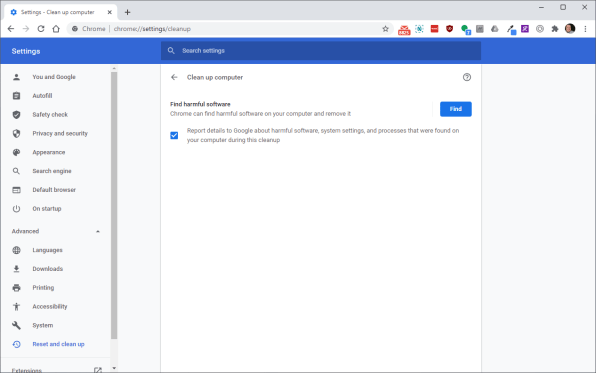
So if things just seem a little odd—unexpected popups, site redirects, and other weirdness—open the three-dot menu in Chrome’s upper-right corner, then navigate to Settings > Advanced > Reset and cleanup.
From there, click “Clean up computer” to kick off a quick scan for malware, browser hijacking, evil extensions, and other naughty nonsense.
Check for compromised passwords
If you’ve been online for any meaningful length of time and you haven’t been…
Read More…
Source : fastcompany.com
Source link